Skip to content
View in the app

A better way to browse. Learn more.

Bimmer Owners Club - BMW Forum for BMW Owners

A full-screen app on your home screen with push notifications, badges and more.

To install this app on iOS and iPadOS
  1. Tap the Share icon in Safari
  2. Scroll the menu and tap Add to Home Screen.
  3. Tap Add in the top-right corner.
To install this app on Android
  1. Tap the 3-dot menu (⋮) in the top-right corner of the browser.
  2. Tap Add to Home screen or Install app.
  3. Confirm by tapping Install.

My First Bimmer

Featured Replies

Good afternoon all,


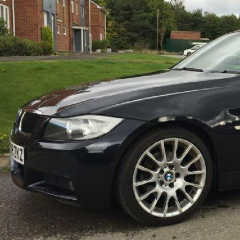
Bought my first ever BMW two days ago and I've already fallen in love with it. Can't believe I wasted so much time before "getting with the program". 

It's an E90, 2008, 318i. M-sport trim and has been incredibly well looked after, can't believe how lucky I got with this find.

I'm up in the North East, 35 years old, chemist by education and manufacturing engineer by trade (run my own little business). So I'm not a mechanic, but also not clueless and will help out wherever I can as appropriate on other people's questions. Mine will mostly be about the nuances of BMWs in particular. Though they do seem well designed and logical beasts so shouldn't be much to ask.

Couple of photos of the new lady....................

Screenshot_20170918-134344.thumb.png.3f357ea1b5c3f09eaa8433ad5467a574.pngScreenshot_20170918-134411.thumb.png.0eb551e5a6e43479fa76a3d67c725cd2.png


ATB,

Simon


Latest Deals

BMW Official Store for genuine BMW parts & accessories

Disclaimer: As the club is an eBay Partner, The club may be compensated if you make a purchase via eBay links

Join the conversation

You can post now and register later. If you have an account, sign in now to post with your account.
Note: Your post will require moderator approval before it will be visible.

Guest
Reply to this topic...
Background Picker
Customize Layout

Account

Navigation

Search

Search

Configure browser push notifications

Chrome (Android)
  1. Tap the lock icon next to the address bar.
  2. Tap Permissions → Notifications.
  3. Adjust your preference.
Chrome (Desktop)
  1. Click the padlock icon in the address bar.
  2. Select Site settings.
  3. Find Notifications and adjust your preference.