Jump to content
View in the app

A better way to browse. Learn more.

Bimmer Owners Club - BMW Forum for BMW Owners

A full-screen app on your home screen with push notifications, badges and more.

To install this app on iOS and iPadOS
  1. Tap the Share icon in Safari
  2. Scroll the menu and tap Add to Home Screen.
  3. Tap Add in the top-right corner.
To install this app on Android
  1. Tap the 3-dot menu (⋮) in the top-right corner of the browser.
  2. Tap Add to Home screen or Install app.
  3. Confirm by tapping Install.

Featured Replies

As stated possibly this is going to be a stupid question but have always been told the only stupid question is an unasked one 🤷🏻‍♂️

But anyway

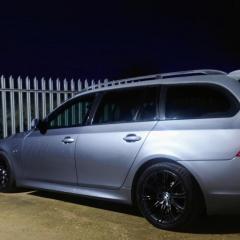
I'm wanting to change/replace the headlight bulbs in my 2007 E61 LCI 535

So was wondering what bulbs I'd need to look for as seams to be various configurations available 🤔 so some help would be appreciated 👍🏻

Thanks in advance

Paul

Hi Paul

Use the last 7 digits of your Vin to search www.realoem.com it will bring up your model the look in lights

Before spending your hard earned are the lens's clean? Not clouded. A bit of elbow grease could be the answer

Dave

And yes the old saying is right

  • Author
On 2/19/2023 at 11:03 AM, Greydog said:

Hi Paul

Use the last 7 digits of your Vin to search www.realoem.com it will bring up your model the look in lights

Before spending your hard earned are the lens's clean? Not clouded. A bit of elbow grease could be the answer

Dave

And yes the old saying is right

Evening Dave,

Have had a look on realoem site but was just wanting something a bit brighter than what I've got already as the light being emitted just don't seam as bright as once was and yes the lenses are clear, not crystal clear but not all hazed or cloudy.

Cheers Paul 

Latest Deals

BMW Official Store for genuine BMW parts & accessories

Disclaimer: As the club is an eBay Partner, The club may be compensated if you make a purchase via eBay links

Join the conversation

You can post now and register later. If you have an account, sign in now to post with your account.
Note: Your post will require moderator approval before it will be visible.

Guest
Reply to this topic...
Background Picker
Customize Layout

Configure browser push notifications

Chrome (Android)
  1. Tap the lock icon next to the address bar.
  2. Tap Permissions → Notifications.
  3. Adjust your preference.
Chrome (Desktop)
  1. Click the padlock icon in the address bar.
  2. Select Site settings.
  3. Find Notifications and adjust your preference.