Jump to content
View in the app

A better way to browse. Learn more.

Bimmer Owners Club - BMW Forum for BMW Owners

A full-screen app on your home screen with push notifications, badges and more.

To install this app on iOS and iPadOS
  1. Tap the Share icon in Safari
  2. Scroll the menu and tap Add to Home Screen.
  3. Tap Add in the top-right corner.
To install this app on Android
  1. Tap the 3-dot menu (⋼) in the top-right corner of the browser.
  2. Tap Add to Home screen or Install app.
  3. Confirm by tapping Install.

Featured Replies

Well
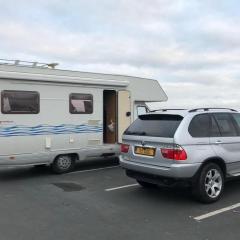
. I thought it would be a good Christmas present, so I bought my wife Kedma a private number plate. 
I couldn’t bare to part with the x5 plate, so she got a car to put it on! Lol.

again
 not a bmw, but it’s cheaper and does more than 17mpg so we are both happy
 and it means I get to use the x5 more đŸ˜ŹđŸ‘đŸ»
 

i got it for a bargain price with a full mot but it had a bad dent in the boot lid. Sourced and sprayed a second hand one, just waiting for the badges to arrive. 
not bad for less than a grand including boot, paint and plates
 still not an m3 though 


AE091418-7A9A-4240-B008-C83EA26DEA3F.jpeg

5884FAD9-37D5-41FE-88BA-08268FC6A676.jpeg

Morning Stu

Well, that's a great buy 😄 your right not an M3, but a smiley wife is absolutely pricelessÂ đŸ€ŁÂ 

Right now, an increase in economy is a bonus too well spotted mate

Dave


  • Author


. So
. I took the x5 out for a spin as I finally get a go now
. Got a letter from the police politely informing me I did 69mph uphill and they are about to lighten my wallet. 🙄😂

Latest Deals

BMW Official Store for genuine BMW parts & accessories

Disclaimer: As the club is an eBay Partner, The club may be compensated if you make a purchase via eBay links

Join the conversation

You can post now and register later. If you have an account, sign in now to post with your account.
Note: Your post will require moderator approval before it will be visible.

Guest
Reply to this topic...
Background Picker
Customize Layout

Configure browser push notifications

Chrome (Android)
  1. Tap the lock icon next to the address bar.
  2. Tap Permissions → Notifications.
  3. Adjust your preference.
Chrome (Desktop)
  1. Click the padlock icon in the address bar.
  2. Select Site settings.
  3. Find Notifications and adjust your preference.