Skip to content
View in the app

A better way to browse. Learn more.

Bimmer Owners Club - BMW Forum for BMW Owners

A full-screen app on your home screen with push notifications, badges and more.

To install this app on iOS and iPadOS
  1. Tap the Share icon in Safari
  2. Scroll the menu and tap Add to Home Screen.
  3. Tap Add in the top-right corner.
To install this app on Android
  1. Tap the 3-dot menu (⋮) in the top-right corner of the browser.
  2. Tap Add to Home screen or Install app.
  3. Confirm by tapping Install.

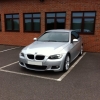
2009 320d M Sport Coupe - Warning Light

Featured Replies

Hi,

So I finally got my hands on my new car on Friday. I've had it off my father-in-law and it's unbelievably nice to drive. Having never owned or driven a BMW before, I didn't know what to expect, but it's amazing. The car runs perfect, but after having a little look round and try all the buttons, I've noticed that next to the milometer I have a warning triangle, with an exclamation mark inside with a 3 digit number next to it. It cycles through various numbers. Can anyone shed any light on what these numbers mean?

Many thanks,

Taz

Have you tried using the toggle on the indicator stalk till the CHECK comes up and pressing the button on the end. It could just be your tyre pressures need checking and resetting or numerous other things. If it was an engine issue the EML would come on.

  • Author

I'd not managed to work out how to scroll through that menu, so thanks Bruce for telling me. I'll take a look at this tonight to see what the numbers are and whether it tells me what they are. It's been into BMW the weekend before last to have the timing chain recall done. I'll get some pictures up once I've given it a clean :) didn't get chance this weekend, had a family wedding.

  • 2 months later...

Hi Taz, Did you ever find out what this was? I have recently bought mine, and have noticed the same thing on the dash and was wondering what it was!

The triangle also comes up when your low on fuel.

Latest Deals

BMW Official Store for genuine BMW parts & accessories

Disclaimer: As the club is an eBay Partner, The club may be compensated if you make a purchase via eBay links

Join the conversation

You can post now and register later. If you have an account, sign in now to post with your account.
Note: Your post will require moderator approval before it will be visible.

Guest
Reply to this topic...
Background Picker
Customize Layout

Account

Navigation

Search

Search

Configure browser push notifications

Chrome (Android)
  1. Tap the lock icon next to the address bar.
  2. Tap Permissions → Notifications.
  3. Adjust your preference.
Chrome (Desktop)
  1. Click the padlock icon in the address bar.
  2. Select Site settings.
  3. Find Notifications and adjust your preference.