Skip to content
View in the app

A better way to browse. Learn more.

Bimmer Owners Club - BMW Forum for BMW Owners

A full-screen app on your home screen with push notifications, badges and more.

To install this app on iOS and iPadOS
  1. Tap the Share icon in Safari
  2. Scroll the menu and tap Add to Home Screen.
  3. Tap Add in the top-right corner.
To install this app on Android
  1. Tap the 3-dot menu (⋮) in the top-right corner of the browser.
  2. Tap Add to Home screen or Install app.
  3. Confirm by tapping Install.

Joining The Club Tomorrow - Fingers Crossed...

Featured Replies

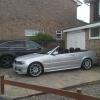
So I viewed a 2004 330ci Sport today, liked it and am due to collect it tomorrow.

All seems well, other than the passenger window which occasionally when raised with all four at once, doesn't quite shut and needs to be closed individually. I will try the reset thing tomorrow but it may need a new part - find out tomorrow I guess.

Has the sat nav and tv, but the tv needs the digital thing to make it work. Where is best to get one of these and how hard are they to fit? any ideas?

Also, does anyone use the BMW wind deflector thing over the back seats? I wondered how effective they are?

Looking forward BMW ownership.

Any tips?

Latest Deals

BMW Official Store for genuine BMW parts & accessories

Disclaimer: As the club is an eBay Partner, The club may be compensated if you make a purchase via eBay links

Join the conversation

You can post now and register later. If you have an account, sign in now to post with your account.
Note: Your post will require moderator approval before it will be visible.

Guest
Reply to this topic...
Background Picker
Customize Layout

Account

Navigation

Search

Search

Configure browser push notifications

Chrome (Android)
  1. Tap the lock icon next to the address bar.
  2. Tap Permissions → Notifications.
  3. Adjust your preference.
Chrome (Desktop)
  1. Click the padlock icon in the address bar.
  2. Select Site settings.
  3. Find Notifications and adjust your preference.