Jump to content
View in the app

A better way to browse. Learn more.

Bimmer Owners Club - BMW Forum for BMW Owners

A full-screen app on your home screen with push notifications, badges and more.

To install this app on iOS and iPadOS
  1. Tap the Share icon in Safari
  2. Scroll the menu and tap Add to Home Screen.
  3. Tap Add in the top-right corner.
To install this app on Android
  1. Tap the 3-dot menu (⋮) in the top-right corner of the browser.
  2. Tap Add to Home screen or Install app.
  3. Confirm by tapping Install.

New Member

Featured Replies

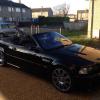
hi all im carl from swindon in wilts. im no stranger to bmw's had loads of e36's 320, 323, 325 what i converted to a s50 m3, 328 sport etc and some compacts and a few e46's 328 ci, 330d touring but now currently have a 2001 530i sport manual in imola red and a 2001 325 ti compact well thats the misses motor. i hope the club will be going to the bmw show at pod this year as would like to go meet a few mumbers and have a good day. well wont go on any longer but any meets etc down south give me a shout

post-7007-0-24780700-1373962842_thumb.jp

Welcome aboard Carl ;)

welcome to bmwoc mate.yes we'll be at the pod with a club stand

Welcome to the club :)

Latest Deals

BMW Official Store for genuine BMW parts & accessories

Disclaimer: As the club is an eBay Partner, The club may be compensated if you make a purchase via eBay links

Join the conversation

You can post now and register later. If you have an account, sign in now to post with your account.
Note: Your post will require moderator approval before it will be visible.

Guest
Reply to this topic...
Background Picker
Customize Layout

Account

Navigation

Search

Configure browser push notifications

Chrome (Android)
  1. Tap the lock icon next to the address bar.
  2. Tap Permissions → Notifications.
  3. Adjust your preference.
Chrome (Desktop)
  1. Click the padlock icon in the address bar.
  2. Select Site settings.
  3. Find Notifications and adjust your preference.