
Jump to content
View in the app

A better way to browse. Learn more.

Bimmer Owners Club - BMW Forum for BMW Owners

A full-screen app on your home screen with push notifications, badges and more.

To install this app on iOS and iPadOS
  1. Tap the Share icon in Safari
  2. Scroll the menu and tap Add to Home Screen.
  3. Tap Add in the top-right corner.
To install this app on Android
  1. Tap the 3-dot menu (⋮) in the top-right corner of the browser.
  2. Tap Add to Home screen or Install app.
  3. Confirm by tapping Install.

Leaderboard

Popular Content

Showing content with the highest reputation on 11/29/2019 in all areas

  1. Found it by searching BMW Owners club on Google. Also am finding it difficult to use. Obviously BMW is faster than I am.
  2. https://www.youtube.com/watch?v=Ykag3LTRPRM&t=14s
  3. I was looking for some way to connect with more people.. even Facebook has become quite divisionalised.. or it always has been.. either way.. it would be cool to get to know peeps on the other side of the pond. Sharing videos about cars and car related stuff. You know what to do....
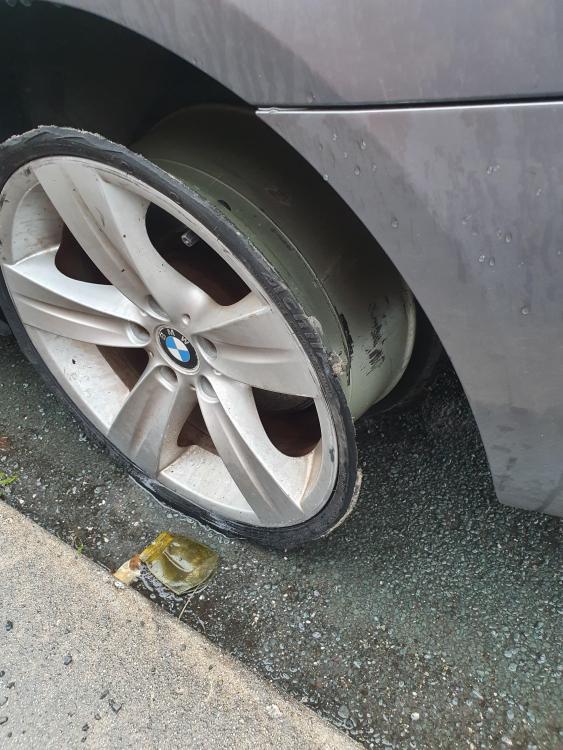
  4. Hello, I am a new user to this forum. I was hoping someone could help me to track down a used Alloy wheel the same as the one in the picture . I had a blow out on the motorway the other night and the wheel is obviously Caput. Was very lucky that no further damage came to me or my car. It's a 3 series coupe 2007 Would much appreciate it
eBay disclaimer: As the club is an eBay Partner, The club may be compensated if you make a purchase you make on eBay via the club.

DISCLAIMER: Bimmerownersclub.com is an independent BMW car forum for owners of BMW vehicles. The club is not part of BMW nor affiliated with or endorsed by the offical BMW AG in any way. The material contained in the forums is submitted by the general public, and is not endorsed by Bimmer Owners Club, BMW AG, or Bayerische Motoren Werke AG. The official website for BMW AG can be found at http://www.bmw.co.uk
Background Picker
Customize Layout

Configure browser push notifications

Chrome (Android)
  1. Tap the lock icon next to the address bar.
  2. Tap Permissions → Notifications.
  3. Adjust your preference.
Chrome (Desktop)
  1. Click the padlock icon in the address bar.
  2. Select Site settings.
  3. Find Notifications and adjust your preference.