


Steve77
Regular Member
-
Joined
-
Last visited
Everything posted by Steve77
-
Morning Dave That’s hugely helpful, thank you so much for your reply, it’s very much appreciated and makes perfect sense. That’s what I’ll do, get myself a new screed/head unit. Thanks again and hope you have a great new year. kind regards Steve
-
Hi Dave i think my original question was a bit misleading! I was looking at replacing just the screen, so is that all I need to do? Just replace the screen part and I’m good to go? They all seem to say Android (as you mentioned) but do I need a specific one for Apple or are they one and the same? many thanks steve
-
Morning Dave thank you for your reply, very much appreciated. Please ignore my ignorance, but I use Appe products, so is the principle the same as Android? many thanks steve
-
Good afternoon all, I hope you all had a great Christmas. I'm hoping for some advice. I have a 118D Sport, F21 but my idrive does not have Sat nav or Bluetooth. I’ve done some research as I don’t get why this would be, and having looked in the boot, I don’t have a Combox (I’ve seen these on YouTube). my question is, can I simply upgrade the screen to one that has Apple CarPlay and problem solved? I did originally just try swapping the head unit out but due to the Combox issue, it don’t change anything. Thanks all.Morning Dave thats amazing, thank you so much for your help, really appreciate it. steveHi guys I'm hoping someone can help me. I had a new battery fitted to my 1 series 1.8 Diesel by the AA on Saturday and the guy said it returned an error Coolant Temperature Sensor (pic attached) but said it was an easy fix. I bought a new sensor but I cannot figure out how to change it and YouTube hasn’t turned up any videos on how to do it. Can anyone point me in the right direction with how to do it, ideally with a video please? I’ve found where it is but I can’t figure out how to remove/replace it and don’t want to break anything. Thank you all.
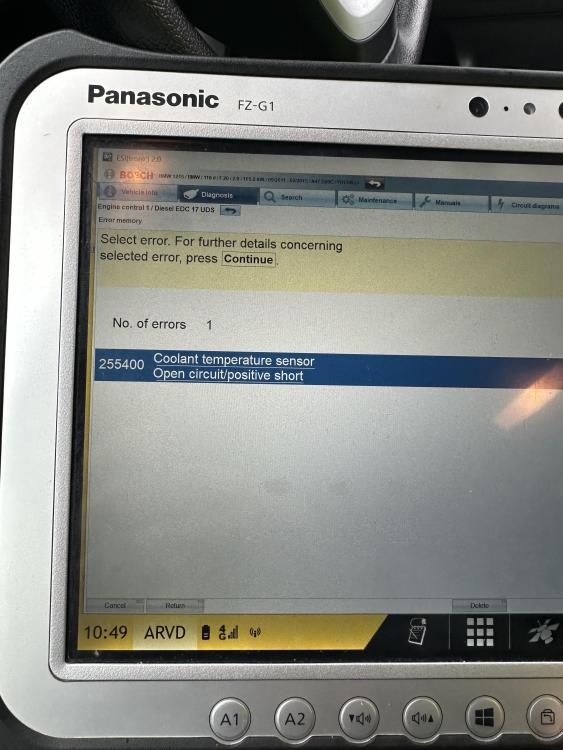 Morning Dave Thank you for your reply, it’s very much appreciated. I think I’m going to leave well alone and I’ll check these guys out. Last thing I want is to make things worse. thanks again steveHi guys, I’ve been having problems with the stereo on my 1 series and I bought a bundle (stereo, screen etc) on eBay. Is it ok to just simply swap over or do I need to something else? im not mechanically minded at all but I can swap the units over, just need to check if its that simple? thanksEvening everyone. I’m hoping you can help me. I’ve just bought my first ever BMW, literally this evening (it’s a 1 series 118D on a 13 plate). Love it already but I have a question about the I drive display. Mine doesn’t have sat nav on it and it also doesn’t play music via Bluetooth or when I plug my phone into the center console. I’ve tried updating the software and it says it’s not needed. If I want the sat nave and Bluetooth / Apple play option, do I need to replace the display screen? If so, is it straightforward? Apologies if this is a stupid question but I’m new to this. Thanks
