Jump to content
View in the app

A better way to browse. Learn more.

Bimmer Owners Club - BMW Forum for BMW Owners

A full-screen app on your home screen with push notifications, badges and more.

To install this app on iOS and iPadOS
  1. Tap the Share icon in Safari
  2. Scroll the menu and tap Add to Home Screen.
  3. Tap Add in the top-right corner.
To install this app on Android
  1. Tap the 3-dot menu (⋮) in the top-right corner of the browser.
  2. Tap Add to Home screen or Install app.
  3. Confirm by tapping Install.

ptaberham1

Regular Member
  • Joined

  • Last visited

Everything posted by ptaberham1

  1. Many thanks guys it has been a pleasure so far over the long weekend looking forward to many years of ownership and hopefully can contribute some of my experiences on the forum :)
  2. Many thanks Bruce yours looks lovely as well have a soft spot for the coupe's but I need an Estate! I'm looking forward to sharing experiences on here.
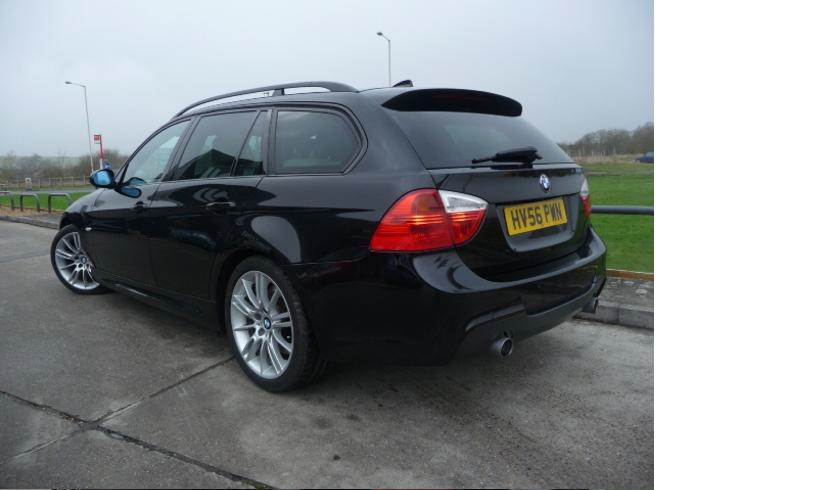
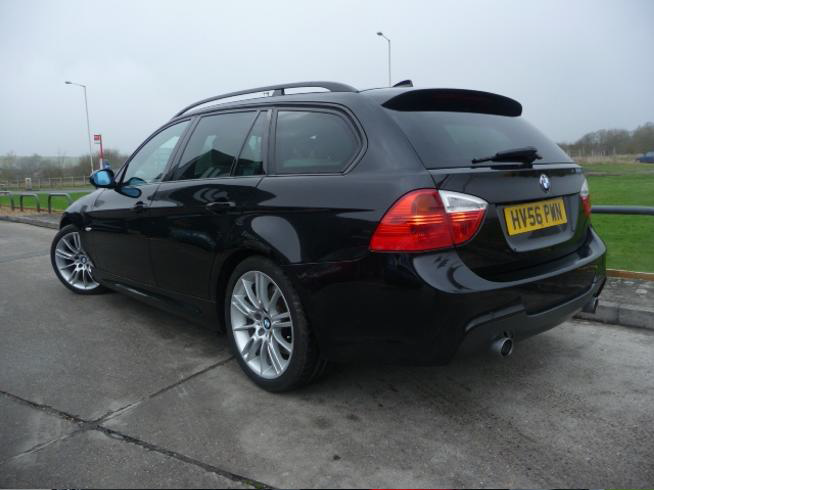
  3. Hello all, I have just today got my first ever BMW which I already love. She is a 56 reg 335d M sport touring in black with Beige Dakota Leather and burr walnut trim. She was a joy to drive home now just hoping that I can keep her in the same lovely condition she is in currently! :) I have attached a photo as an introduction although its not very good! What I like the most is the full length sunroof although with the British Weather it seems a bit pointless! Thanks
eBay disclaimer: As the club is an eBay Partner, The club may be compensated if you make a purchase you make on eBay via the club.

DISCLAIMER: Bimmerownersclub.com is an independent BMW car forum for owners of BMW vehicles. The club is not part of BMW nor affiliated with or endorsed by the offical BMW AG in any way. The material contained in the forums is submitted by the general public, and is not endorsed by Bimmer Owners Club, BMW AG, or Bayerische Motoren Werke AG. The official website for BMW AG can be found at http://www.bmw.co.uk
Background Picker
Customize Layout

Configure browser push notifications

Chrome (Android)
  1. Tap the lock icon next to the address bar.
  2. Tap Permissions → Notifications.
  3. Adjust your preference.
Chrome (Desktop)
  1. Click the padlock icon in the address bar.
  2. Select Site settings.
  3. Find Notifications and adjust your preference.