
Skip to content
View in the app

A better way to browse. Learn more.

Bimmer Owners Club - BMW Forum for BMW Owners

A full-screen app on your home screen with push notifications, badges and more.

To install this app on iOS and iPadOS
  1. Tap the Share icon in Safari
  2. Scroll the menu and tap Add to Home Screen.
  3. Tap Add in the top-right corner.
To install this app on Android
  1. Tap the 3-dot menu (â‹®) in the top-right corner of the browser.
  2. Tap Add to Home screen or Install app.
  3. Confirm by tapping Install.

Mrf1993

Regular Member
  • Joined

  • Last visited

  1. Appreciate the reply! Had a look and cannot find the part anywhere, cannot find it on the BMW website either! Any ideas?
  2. Mrf1993 joined the community
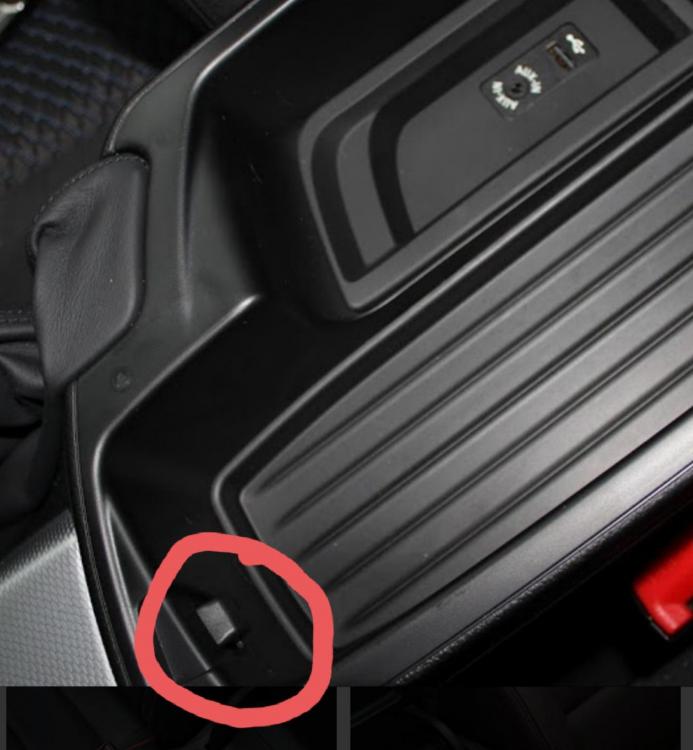
  3. Has anyone come across this small latch braking before? Mine has come off and fallen into the gap behind it and I cannot find a replacement anywhere or even find out what it is called. any help would be very appreciated 👍
Background Picker
Customize Layout

Account

Navigation

Search

Search

Configure browser push notifications

Chrome (Android)
  1. Tap the lock icon next to the address bar.
  2. Tap Permissions → Notifications.
  3. Adjust your preference.
Chrome (Desktop)
  1. Click the padlock icon in the address bar.
  2. Select Site settings.
  3. Find Notifications and adjust your preference.