
Jump to content
View in the app

A better way to browse. Learn more.

Bimmer Owners Club - BMW Forum for BMW Owners

A full-screen app on your home screen with push notifications, badges and more.

To install this app on iOS and iPadOS
  1. Tap the Share icon in Safari
  2. Scroll the menu and tap Add to Home Screen.
  3. Tap Add in the top-right corner.
To install this app on Android
  1. Tap the 3-dot menu (⋮) in the top-right corner of the browser.
  2. Tap Add to Home screen or Install app.
  3. Confirm by tapping Install.

ibbo1966

Members
  • Joined

  • Last visited

Everything posted by ibbo1966

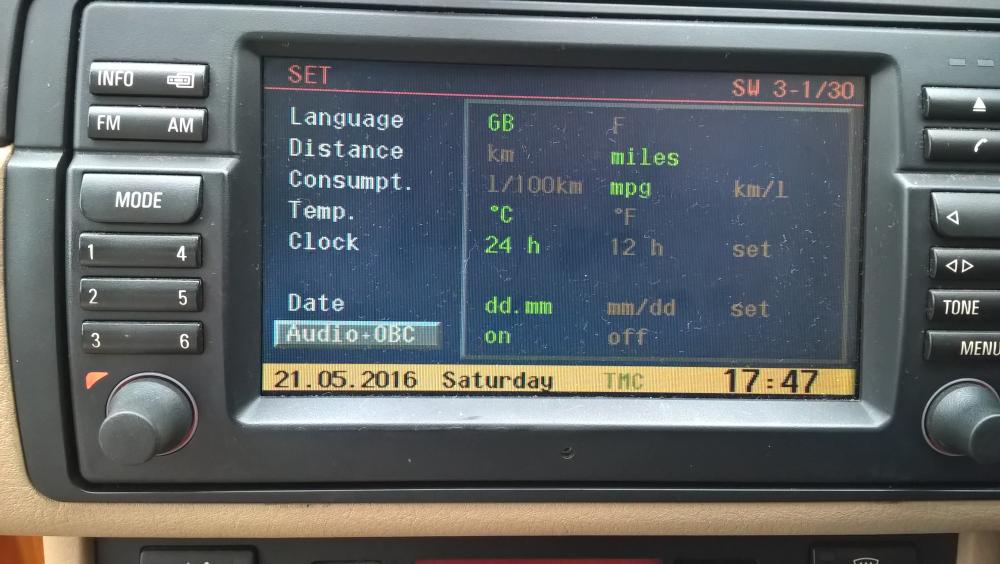
  1. I have a 2003 BMW325ti which is fitting with the onboard monitor which includes the Radio&Cassette and SAT Nav, which I need some help with please How do I find out the exact model of the system? The system is powers on fine but the radio does not power on every time as indicated by the radio light in the bottom left hand corner, and sometimes the radio is on an working without the light being in - All a bit confusing I know! - Has anyone else experienced this fault and found a solution? The system seems a bit temperamental and I am wondering if a software update is what is required? The current software version is SW3-1/30 - Please see attached image. Any help appreciated. Many Thanks
Background Picker
Customize Layout

Configure browser push notifications

Chrome (Android)
  1. Tap the lock icon next to the address bar.
  2. Tap Permissions → Notifications.
  3. Adjust your preference.
Chrome (Desktop)
  1. Click the padlock icon in the address bar.
  2. Select Site settings.
  3. Find Notifications and adjust your preference.