


stevie320dspt/k900
Regular Member
-
Joined
-
Last visited
Everything posted by stevie320dspt/k900
-
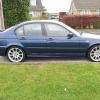 Hi Claire. Good on ya. Nice One! Have just become a club member & was wondering the same thing. ;) As well as my (03) 320 D SPORT, I have an (01) Kawasaki ZX9R :ph34r: .. Always been a Biker & wanted a decent motor to compliment it. Have had the Bike since new. The Beemer for just over a year. Am now one VERY HAPPY Petrolhead like you. B)
