Jump to content
View in the app

A better way to browse. Learn more.

Bimmer Owners Club - BMW Forum for BMW Owners

A full-screen app on your home screen with push notifications, badges and more.

To install this app on iOS and iPadOS
  1. Tap the Share icon in Safari
  2. Scroll the menu and tap Add to Home Screen.
  3. Tap Add in the top-right corner.
To install this app on Android
  1. Tap the 3-dot menu (⋮) in the top-right corner of the browser.
  2. Tap Add to Home screen or Install app.
  3. Confirm by tapping Install.

x5carper

Regular Member
  • Joined

  • Last visited

  1. Greydog, your boot isn't very clean ! Lol
  2. Hi, I have just done mine I used Pro shine no water cleaner/polish and it seems to work, you can get it on ebay!
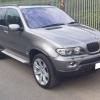
  3. Hi Guys and Galls, I am new to this site although I do use " X DRIVERS" forum, I have had x5's for almost eight years now my first was and still is a 2003 e53 3.0d and we still own her, the second was a 2007 e70 3.0d and to be frank they aren't a patch on the e53 model so that has now gone, the latest to the stable is a stunning 2006 e53 3.0d sport in sterling grey and with only a guaranteed 64k on the clock should last me a few years to come I hope. My interests are carp fishing and getting away with the caravan.
eBay disclaimer: As the club is an eBay Partner, The club may be compensated if you make a purchase you make on eBay via the club.

DISCLAIMER: Bimmerownersclub.com is an independent BMW car forum for owners of BMW vehicles. The club is not part of BMW nor affiliated with or endorsed by the offical BMW AG in any way. The material contained in the forums is submitted by the general public, and is not endorsed by Bimmer Owners Club, BMW AG, or Bayerische Motoren Werke AG. The official website for BMW AG can be found at http://www.bmw.co.uk
Background Picker
Customize Layout

Configure browser push notifications

Chrome (Android)
  1. Tap the lock icon next to the address bar.
  2. Tap Permissions → Notifications.
  3. Adjust your preference.
Chrome (Desktop)
  1. Click the padlock icon in the address bar.
  2. Select Site settings.
  3. Find Notifications and adjust your preference.