


steviehp1
Members
-
Joined
-
Last visited
Everything posted by steviehp1
-
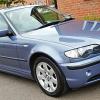 Hi, I'm new to the BMer family so as not to be rude I thought I'd pop in and say hi. This is my first BMW, I've previously had Vauxhalls, Ford's and a little Rover 25, but now I'm happy to be one of you guys too. I now own 53 plate 320d saloon, wearing 150K, but she drives like she's done half that. Well maintained and looked after. I will leave it there for now but no doubts I will be requiring answers to something in the near future. Have a good day all. L8trz. ☺
