


Tomjutla
Members
-
Joined
-
Last visited
Everything posted by Tomjutla
-
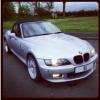 Hi All Just bought myself a Z3 fantastic little car... I have a few questions though. 1. Why is the Z3 classed as an E36 but when you type that in it shows an old saloon bmw. 2. All body kits look like a tacky OTT Fast and furious look. anyone know where i can find the old Aero kit from they seem impossible to get my hands on. 3. anyone know where i can get the Z3m side grills from i prefer them but cant buy them.... 4. finally Meets would like to go to Z meets but none seem to be anywhere near the west london area. any reason for this ?? thanks guys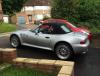
-
-
Pictures of my Z3

eBay disclaimer: As the club is an eBay Partner, The club may be compensated if you make a purchase you make on eBay via the club.
DISCLAIMER: Bimmerownersclub.com is an independent BMW car forum for owners of BMW vehicles. The club is not part of BMW nor affiliated with or endorsed by the offical BMW AG in any way. The material contained in the forums is submitted by the general public, and is not endorsed by Bimmer Owners Club, BMW AG, or Bayerische Motoren Werke AG. The official website for BMW AG can be found at http://www.bmw.co.uk
DISCLAIMER: Bimmerownersclub.com is an independent BMW car forum for owners of BMW vehicles. The club is not part of BMW nor affiliated with or endorsed by the offical BMW AG in any way. The material contained in the forums is submitted by the general public, and is not endorsed by Bimmer Owners Club, BMW AG, or Bayerische Motoren Werke AG. The official website for BMW AG can be found at http://www.bmw.co.uk