


Mitchell241
Regular Member
-
Joined
-
Last visited
-
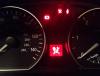
 That's just the handbrake mate
 -
Cheers mate iv got it booked in for Friday should be done then, thanks for the help mate
-
I had the bloke turn the light off but it came back on about 4 days later
-
Hi guys Could anyone help me this light came on the other day when I started my car up and iv had it plugged in and the bloke said it would need a bmw specialist because he couldn't tell what it was, has anyone had this light on before and could tell me what if could be ??
-
That would be good mate all the meets are to pretty far
-
Hi my name is dean I'm new bmw and just wanted to know if there are any meets near birminghsm way ??
-
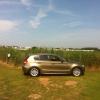
Hi everyone I have owned my first bmw for about 7 months now, best car iv had, hopefully get to some meets this year, anyway here she is

eBay disclaimer: As the club is an eBay Partner, The club may be compensated if you make a purchase you make on eBay via the club.
DISCLAIMER: Bimmerownersclub.com is an independent BMW car forum for owners of BMW vehicles. The club is not part of BMW nor affiliated with or endorsed by the offical BMW AG in any way. The material contained in the forums is submitted by the general public, and is not endorsed by Bimmer Owners Club, BMW AG, or Bayerische Motoren Werke AG. The official website for BMW AG can be found at http://www.bmw.co.uk
DISCLAIMER: Bimmerownersclub.com is an independent BMW car forum for owners of BMW vehicles. The club is not part of BMW nor affiliated with or endorsed by the offical BMW AG in any way. The material contained in the forums is submitted by the general public, and is not endorsed by Bimmer Owners Club, BMW AG, or Bayerische Motoren Werke AG. The official website for BMW AG can be found at http://www.bmw.co.uk