
Jump to content
View in the app

A better way to browse. Learn more.

Bimmer Owners Club - BMW Forum for BMW Owners

A full-screen app on your home screen with push notifications, badges and more.

To install this app on iOS and iPadOS
  1. Tap the Share icon in Safari
  2. Scroll the menu and tap Add to Home Screen.
  3. Tap Add in the top-right corner.
To install this app on Android
  1. Tap the 3-dot menu (⋮) in the top-right corner of the browser.
  2. Tap Add to Home screen or Install app.
  3. Confirm by tapping Install.

Steve_E

Members via FB
  • Joined

  • Last visited

  1. Steve_E changed their profile photo
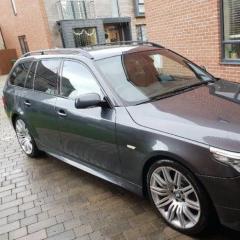
  2. After a few years away from BMW, I have recently purchased an E61 525d Auto 2009. Car is great. Some good history from the most recent owner (missing some before that). One thing I noticed the other morning when I had the door and boot open to load in some stuff, go to start the car and a warning came up with "Increased Battery Discharge". I probably had the doors open for about 20 mins or so, and I guess the interior lights were on, but that was all. Should I be expecting this message just for having the doors open for a while? I then did a short run, and when I came to start the car, it came on again. As I got home, I had to wait for a bin lorry, and I sat there with the radio on, without the engine running, probably for only a minute or two, and then a warning came up saying "Battery charge extremely low". Again, is this normal? I have read that a short on an aftermarket tow bar is a common issue, anything else I should be looking for? Thanks in advance
eBay disclaimer: As the club is an eBay Partner, The club may be compensated if you make a purchase you make on eBay via the club.

DISCLAIMER: Bimmerownersclub.com is an independent BMW car forum for owners of BMW vehicles. The club is not part of BMW nor affiliated with or endorsed by the offical BMW AG in any way. The material contained in the forums is submitted by the general public, and is not endorsed by Bimmer Owners Club, BMW AG, or Bayerische Motoren Werke AG. The official website for BMW AG can be found at http://www.bmw.co.uk
Background Picker
Customize Layout

Configure browser push notifications

Chrome (Android)
  1. Tap the lock icon next to the address bar.
  2. Tap Permissions → Notifications.
  3. Adjust your preference.
Chrome (Desktop)
  1. Click the padlock icon in the address bar.
  2. Select Site settings.
  3. Find Notifications and adjust your preference.