Bracken
Members
-
Joined
-
Last visited
Everything posted by Bracken
-
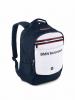
 Hi All I am newbie on this site as I am currently researching BMW and its relationship / sponsorship of BMW owners club in Ireland & UK as part of a Masters degree. I have attached a short online survey that is completely confidential. I am also offering a free draw for a BMW M-Sport backpack (see attached image) for the first 100 completed surveys received from owners club members. Please click on link below to enter https://www.surveymonkey.com/s/3RSVNC8 Many Thanks Bracken