
Jump to content
View in the app

A better way to browse. Learn more.

Bimmer Owners Club - BMW Forum for BMW Owners

A full-screen app on your home screen with push notifications, badges and more.

To install this app on iOS and iPadOS
  1. Tap the Share icon in Safari
  2. Scroll the menu and tap Add to Home Screen.
  3. Tap Add in the top-right corner.
To install this app on Android
  1. Tap the 3-dot menu (⋮) in the top-right corner of the browser.
  2. Tap Add to Home screen or Install app.
  3. Confirm by tapping Install.

maxnpaddy247

Regular Member
  • Joined

  • Last visited

Everything posted by maxnpaddy247

  1. Cheers Prestige...... That was my philosophy when I decided to buy it...! I believe Aldi beans are very nice...they will have to be to pay for the insurance...lol!
  2. Cheers ..... You are of course absolutely right!
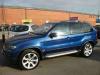
  3. I've just retired....at the ripe old age of 50 and thought I'd treat myself to something to mark the occasion.... One shopping trip later and I've put a deposit down on a 2006 X5 3.0 diesel Sport Exclusve wi upgraded leather interior... I haven't slept since.....Oh to hell with it it's only money!! So....thought I'd join other beemer lovers (it's my second) and say hi!! :rolleyes: This is my new toy!!
Background Picker
Customize Layout

Configure browser push notifications

Chrome (Android)
  1. Tap the lock icon next to the address bar.
  2. Tap Permissions → Notifications.
  3. Adjust your preference.
Chrome (Desktop)
  1. Click the padlock icon in the address bar.
  2. Select Site settings.
  3. Find Notifications and adjust your preference.