


terrym233
Regular Member
-
Joined
-
Last visited
Everything posted by terrym233
-
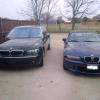 HI, Guess I actually joined this group on Feb.2,2012 but just saying hi now. I've had a 1997 Z3 for years and just recently bought a 2008 750 Li to keep it company. The Z3 has been great. Sure, some expenses, I'd guess maybe on average $1000 a year for things that broke...maybe less. I'm a bit concerned with 750 as far as potential repair costs - at least it is under factory warranty until November :) Other than that, love that smooth, quiet, powerful ride. /Terry
 -
Hey, Just joined this group. I bought my 1997 Z3 in 2000 and still have and drive it. It is the car I use the most for the work commute. Just bought a 2008 750Li to keep it company :) /Terry
