


Andrewkuk
Regular Member
-
Joined
-
Last visited
Everything posted by Andrewkuk
-
 Thank you and do you know what the missing part is?
 -
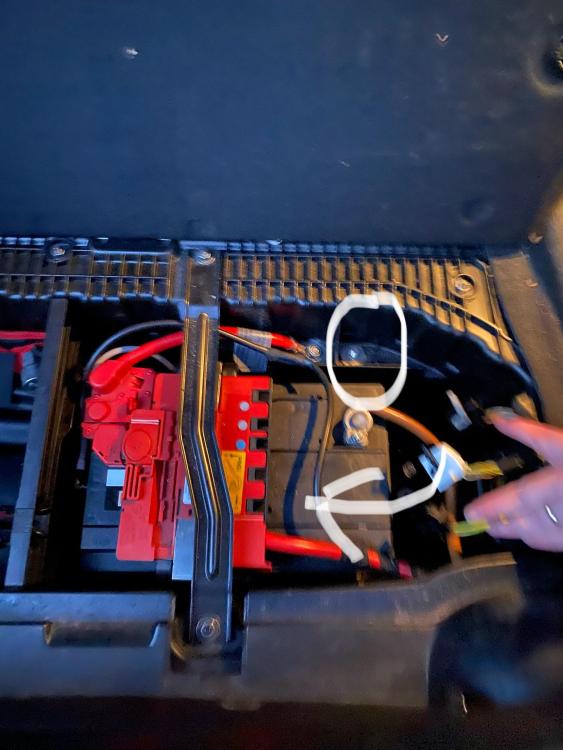
Thank you. Do you know if there is a red cable missing as I have seen it on other 1 series?
-
Hi Dave - Thank you got the excellent advice and information. Could you tell me where the main fuse box is (never had a BMW before)? We have a friend coming over to scan the car on Thursday so hopefully sort out the issues or at least know what to fix first. Thanks once again - Kind regards Andrew
-
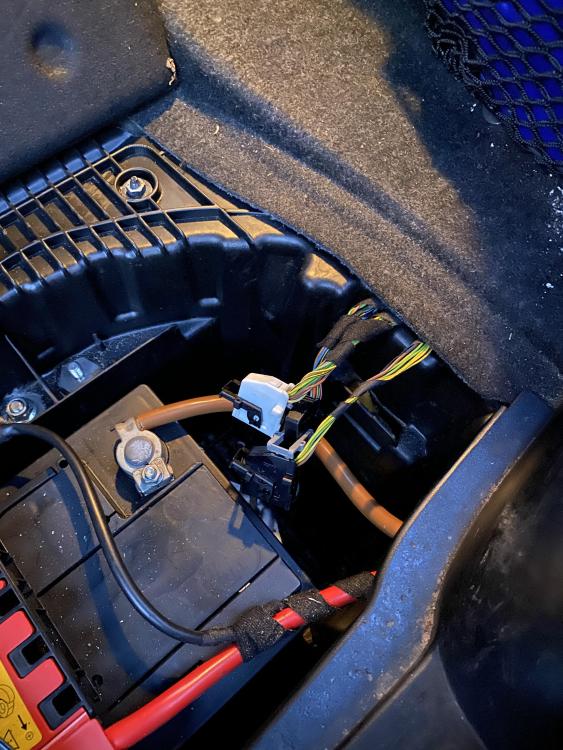
Hi - I have a 2007 1.6L Petrol 1 series and it has wire connectors in the boot near the battery but I don't know what they are meant to connect to. Are they just spare or is there a part missing? The car currently not starting but we think it is a BCM fault but just wanted to know what the cables in the boot are meant for. Any help would be greatly appreciated be gratefully appreciated as we can't read the fault codes as we think the BCM is faulty and the car won't idle properly but there might be some other issue. Regards Andrew


eBay disclaimer: As the club is an eBay Partner, The club may be compensated if you make a purchase you make on eBay via the club.
DISCLAIMER: Bimmerownersclub.com is an independent BMW car forum for owners of BMW vehicles. The club is not part of BMW nor affiliated with or endorsed by the offical BMW AG in any way. The material contained in the forums is submitted by the general public, and is not endorsed by Bimmer Owners Club, BMW AG, or Bayerische Motoren Werke AG. The official website for BMW AG can be found at http://www.bmw.co.uk
DISCLAIMER: Bimmerownersclub.com is an independent BMW car forum for owners of BMW vehicles. The club is not part of BMW nor affiliated with or endorsed by the offical BMW AG in any way. The material contained in the forums is submitted by the general public, and is not endorsed by Bimmer Owners Club, BMW AG, or Bayerische Motoren Werke AG. The official website for BMW AG can be found at http://www.bmw.co.uk