


Sdspeed
Regular Member
-
Joined
-
Last visited
Everything posted by Sdspeed
-
 Good to know Dave, Thanks! If I can't use them on the fob I'll put em on something. Here Kitty Kitty:)
 -
I was an airline mechanic up until I retired 2 years ago. There isn't any carrier Under US FAA or EASA regulations that restricts the use of any airtag or similar device. Lufthansa was rumored to have tried, using the interference claim but quickly denied it when it's customers heard about it. Our shop actually put tags on specialized tools so the Tool Room could track them and since new generation tags can have a range of 90' to as much as 450' it help prevent tools from leaving the hanger or being left on the aircraft. The Avionics guys I worked with all seem to agree that for my purposes there shouldn't be any issues and just say to monitor the batteries in the key and tag. They will get you close enough to what ever they're attached to that if you can't se what your looking for you can tap your smartphone and the'll put out a tone like a ring. The ones made by TILE can be used in reverse if you have your FOB but can't find your phone, tap on them and the signal will have your phone ring. I ordered one Apple Airtag and One Tile Pro. I carry a battery for my FOB in my wallet so should they drain the battery I can just toss a new battery in and remove the tag if I decide it's an issue. It'll take awhile to decide but I'm gonna give em a try. !
-
Has anyone put an Airtag or Tile on their key fob? Seeing some mixed comments elsewhere about them causing some type of interference issue and draining the FOB battery.
-
Well my local dealer has the "Card" for about $45 USD which is acceptable and the app can start your car if it has the option package for remote start that uses the Climate Control settings to start it. Supposedly (haven't try it yet) pushing the "Globe" on our FOB's 3 times should remote start them too. I have my window sticker so I know my option package names but have yet to determine what's in each package in any detail. The Card will start it, I'm skeptical though!
-
I don't use smartphones and would like a back-up key with me if I lose the key fob. Anyone have experience with the key cards? My wife does have an IPhone and planned on using the Digital Key, is it a reliable back up? It appears I can get a new one and the car seems to be equipped to use both the app and card, ( I bought the car used and there wasn't one with it). Any known issues etc. TIA
-
Thanks, I'm pretty sure I'll be my own worse enemy again soon. I've decided this is really a 2 ton computer disguised as a car :)
-
Well I contacted BMW of North America Tech Support vis email. They replied promptly and sent directions to program the review mirror buttons. Success! I mis-understood their videos and my Owners Manual when it stated that the car had to be in "Stand-By mode" Having never owned a BMW I thought with me in the car with the fob and my foot on the brake that'd I'd be "Standing by" Wrong, I was suppose to start it and then do the syncing process. Very easy and worked as expected!
-
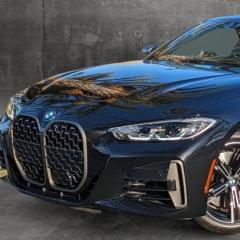
2022 M440i, I've tried using all the info provided in the OM and even one's on Utube. I have a rolling code Chamberlin door opener but I can't get the buttons on the review mirror to work. Lights flash various colors but that's it. Just bought the car a week ago,never had issues with any other brand of car. Any suggestions? TIA
