


Pilko
Regular Member
-
Joined
-
Last visited
-
-
-
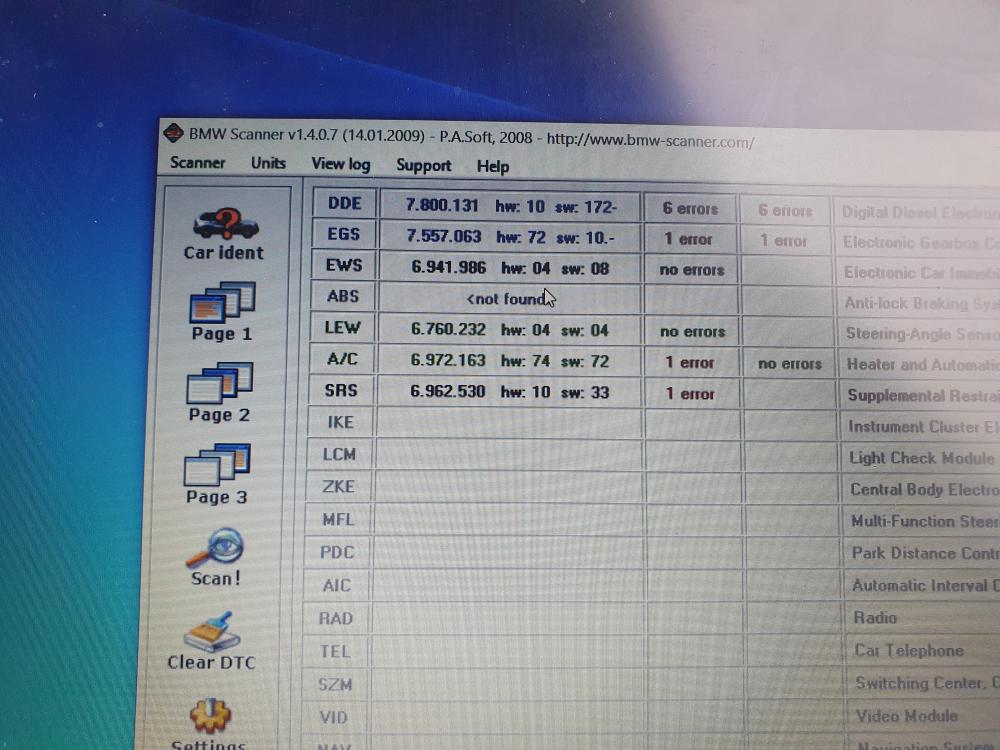
Evening all, Had the trifecta of lights appear intermittently as well as speedo not working, now on permanently. Read that it could be wheel speed sensor on rear left, so on my break at work I swapped the rears to see if its a sensors problem. Got the software to read the faults however and have the message "no abs module". Time to send module for repair ? Thanks 🙂
-
Hi Everyone 🙂 Bought my first X5, Le mans blue 2005. High mileage but drives like its new really. Have an issue with the parking sensors though. When selecting reverse, or pressing the parking sensor button, i get a audible beep for a few seconds and the button flashes green. Looking around online this indicates a fault in the system, had a listen to the sensors and the 4 rear ones all make the clicking noise. The 4 at the front dont, should they? Could all 4 sensors be faulty at once? Will probably have to have codes read at some point , but just seeing if theres any quick and easy fix for it. Thanks!


eBay disclaimer: As the club is an eBay Partner, The club may be compensated if you make a purchase you make on eBay via the club.
DISCLAIMER: Bimmerownersclub.com is an independent BMW car forum for owners of BMW vehicles. The club is not part of BMW nor affiliated with or endorsed by the offical BMW AG in any way. The material contained in the forums is submitted by the general public, and is not endorsed by Bimmer Owners Club, BMW AG, or Bayerische Motoren Werke AG. The official website for BMW AG can be found at http://www.bmw.co.uk
DISCLAIMER: Bimmerownersclub.com is an independent BMW car forum for owners of BMW vehicles. The club is not part of BMW nor affiliated with or endorsed by the offical BMW AG in any way. The material contained in the forums is submitted by the general public, and is not endorsed by Bimmer Owners Club, BMW AG, or Bayerische Motoren Werke AG. The official website for BMW AG can be found at http://www.bmw.co.uk