


Tom Hernandez
Members
-
Joined
-
Last visited
-
Tom Hernandez joined the community
-
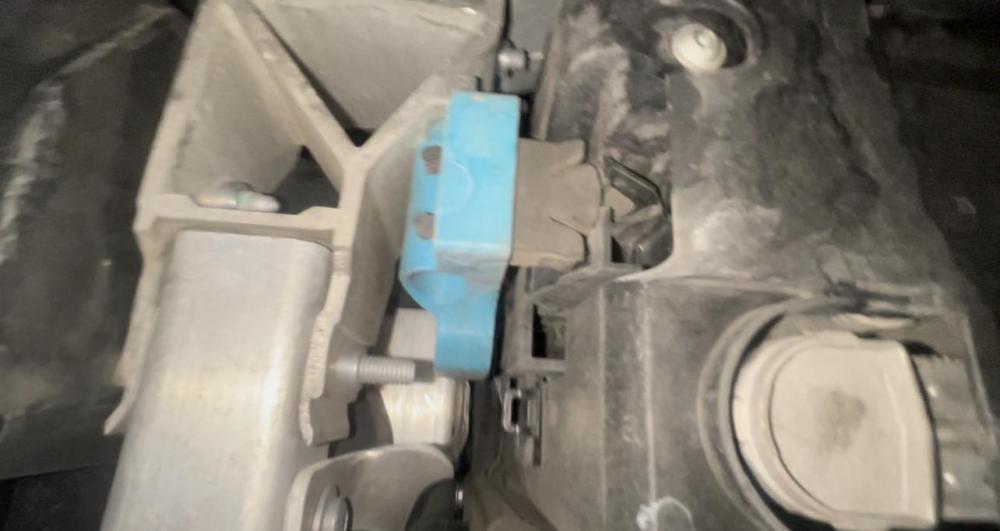
I am trying to drain the radiator of the coolant and do a flush but cannot seem to find where to drain from bottom of car. I have taken off the plastic cover on the front just past the front bumper. Is there more that I need to remove? I have watched every video on YouTube and there were not any with the G11/G12. please help. The photo is for reference so you can see what I am looking at.I

eBay disclaimer: As the club is an eBay Partner, The club may be compensated if you make a purchase you make on eBay via the club.
DISCLAIMER: Bimmerownersclub.com is an independent BMW car forum for owners of BMW vehicles. The club is not part of BMW nor affiliated with or endorsed by the offical BMW AG in any way. The material contained in the forums is submitted by the general public, and is not endorsed by Bimmer Owners Club, BMW AG, or Bayerische Motoren Werke AG. The official website for BMW AG can be found at http://www.bmw.co.uk
DISCLAIMER: Bimmerownersclub.com is an independent BMW car forum for owners of BMW vehicles. The club is not part of BMW nor affiliated with or endorsed by the offical BMW AG in any way. The material contained in the forums is submitted by the general public, and is not endorsed by Bimmer Owners Club, BMW AG, or Bayerische Motoren Werke AG. The official website for BMW AG can be found at http://www.bmw.co.uk