


Dan44
Regular Member
-
Joined
-
Last visited
-
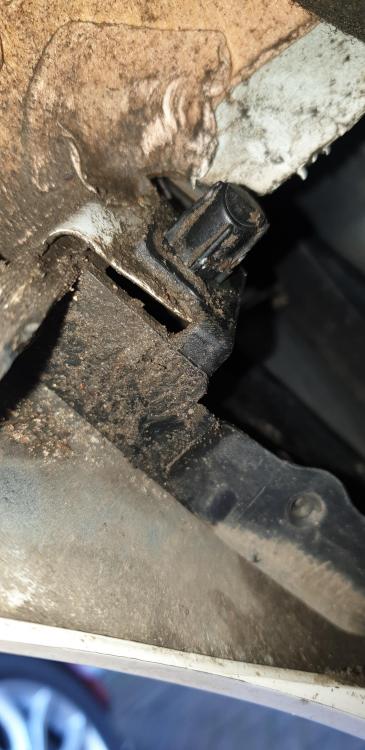
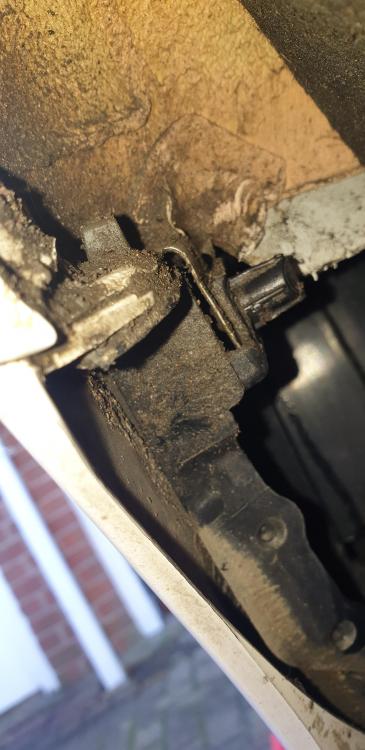
Hi Does anyone know what this clip is? I tried removing the rear bumper of my BMW f21 LCI. I removed all the necessary screws on the bottom and arch and then got stuck and couldn't see what else was holding it on,I could only see this clip? Does anyone know how to remove the bumper and can they tell me if I need to do anything with this clip and or anything else within the arch?? Cheers
-
Hi Dave, Thanks for the reply! Because my car is a sport model and not M sport, will it only bring up sport parts? I'm just wanting to put the M sport bumbers on so not sure if the parts are different? Cheers Dan
-
Dan44 joined the community
-
Hi all, I'm after some information regarding an m sport bumper conversion. So I own a 2017 BMW f21 sport model but I really prefer the m sport bumper looks as theres a lot more customisation available. Does anyone know if this is possible to install the m sport bumpers on the sport model and if so, how much work is involved and what parts are required to do it? Cheers


eBay disclaimer: As the club is an eBay Partner, The club may be compensated if you make a purchase you make on eBay via the club.
DISCLAIMER: Bimmerownersclub.com is an independent BMW car forum for owners of BMW vehicles. The club is not part of BMW nor affiliated with or endorsed by the offical BMW AG in any way. The material contained in the forums is submitted by the general public, and is not endorsed by Bimmer Owners Club, BMW AG, or Bayerische Motoren Werke AG. The official website for BMW AG can be found at http://www.bmw.co.uk
DISCLAIMER: Bimmerownersclub.com is an independent BMW car forum for owners of BMW vehicles. The club is not part of BMW nor affiliated with or endorsed by the offical BMW AG in any way. The material contained in the forums is submitted by the general public, and is not endorsed by Bimmer Owners Club, BMW AG, or Bayerische Motoren Werke AG. The official website for BMW AG can be found at http://www.bmw.co.uk