


zeppy
Regular Member
-
Joined
-
Last visited
Everything posted by zeppy
-
thanks to you both for your reply ,have checked fluid level was slightly down topped it to its correct level light still on, brake pads dont look to bad but will jack car and visually check with wheels removed.
-
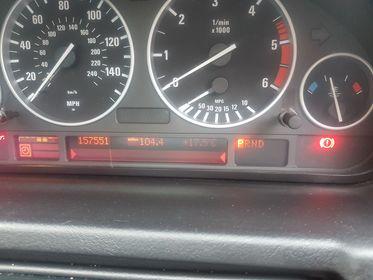
can any body tell me please what the red light under the temp gauge is please.
-
Thanks again bud every bit of knowledge helps.
-
Thanks for your response Dave I'll get it up level on my ramps and check it out,I'll look to see if anything has been done in the service history.
-
my 2006 x5 diesel auto box delays when going into 1st gear after coming to a stop there is a couple of seconds delay it then engages with a very slight clunk is this a serious problem or could the box be low on fluid any help on this problem would greatly appreciated .i am a newcomer to the BMW x5 having owned a land rover Freelander td4 auto before.
eBay disclaimer: As the club is an eBay Partner, The club may be compensated if you make a purchase you make on eBay via the club.
DISCLAIMER: Bimmerownersclub.com is an independent BMW car forum for owners of BMW vehicles. The club is not part of BMW nor affiliated with or endorsed by the offical BMW AG in any way. The material contained in the forums is submitted by the general public, and is not endorsed by Bimmer Owners Club, BMW AG, or Bayerische Motoren Werke AG. The official website for BMW AG can be found at http://www.bmw.co.uk
DISCLAIMER: Bimmerownersclub.com is an independent BMW car forum for owners of BMW vehicles. The club is not part of BMW nor affiliated with or endorsed by the offical BMW AG in any way. The material contained in the forums is submitted by the general public, and is not endorsed by Bimmer Owners Club, BMW AG, or Bayerische Motoren Werke AG. The official website for BMW AG can be found at http://www.bmw.co.uk