


MikeBmth
Regular Member
-
Joined
-
Last visited
-
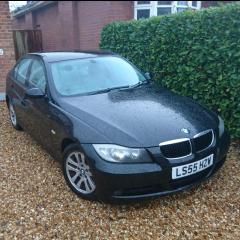 Thanks again......all new to me but enjoying my 320d 🥰
 -
Hiya Dave, I had a look at realoem.com and couldnt find anything suggesting Bluetooth operation bar that some of the early e90's came with a phone built it?! The other site wouldnt work at all, said it didnt recognise my Vin. A bit confused now..lol.. I'll be upgrading the headunit given time anyway as the sound system is pretty horrific in my opinion and obviously the headunit is the biggest restriction to better sounding music in the car
-
Cheers Dave, I'll check the vin later on once coffee and bacon have been consumed
-
-
Hey folks, I have an e90 2005 320d with the business stereo/cd player and have a phone button on unit and steering wheel but tried all YouTube videos on connecting my phone and zip nada nothing?! Seems like it has no Bluetooth?! Have an aux port in arm rest but no USB Any ideas why it isn't working????
-
Hi folks, Just joined up as sure I'll be looking for advice, bought my first Bmw in the last few days a 320d e90 saloon and impressed already! Been around the Vauxhall scene for years but fancied a change so here I am 😂


eBay disclaimer: As the club is an eBay Partner, The club may be compensated if you make a purchase you make on eBay via the club.
DISCLAIMER: Bimmerownersclub.com is an independent BMW car forum for owners of BMW vehicles. The club is not part of BMW nor affiliated with or endorsed by the offical BMW AG in any way. The material contained in the forums is submitted by the general public, and is not endorsed by Bimmer Owners Club, BMW AG, or Bayerische Motoren Werke AG. The official website for BMW AG can be found at http://www.bmw.co.uk
DISCLAIMER: Bimmerownersclub.com is an independent BMW car forum for owners of BMW vehicles. The club is not part of BMW nor affiliated with or endorsed by the offical BMW AG in any way. The material contained in the forums is submitted by the general public, and is not endorsed by Bimmer Owners Club, BMW AG, or Bayerische Motoren Werke AG. The official website for BMW AG can be found at http://www.bmw.co.uk