
Jump to content
View in the app

A better way to browse. Learn more.

Bimmer Owners Club - BMW Forum for BMW Owners

A full-screen app on your home screen with push notifications, badges and more.

To install this app on iOS and iPadOS
  1. Tap the Share icon in Safari
  2. Scroll the menu and tap Add to Home Screen.
  3. Tap Add in the top-right corner.
To install this app on Android
  1. Tap the 3-dot menu (⋮) in the top-right corner of the browser.
  2. Tap Add to Home screen or Install app.
  3. Confirm by tapping Install.

wayne1234

Regular Member
  • Joined

  • Last visited

Everything posted by wayne1234

  1. Thanks Dave, I'll investigate your points further. Much appreciated Wayne
  2. Hi Dave, Thanks for your reply. Yes the tensioners have been replaced. I've also replaced the rear right too. this code cleared with no issues. I've tested the new left unit which is also fine. Wayne
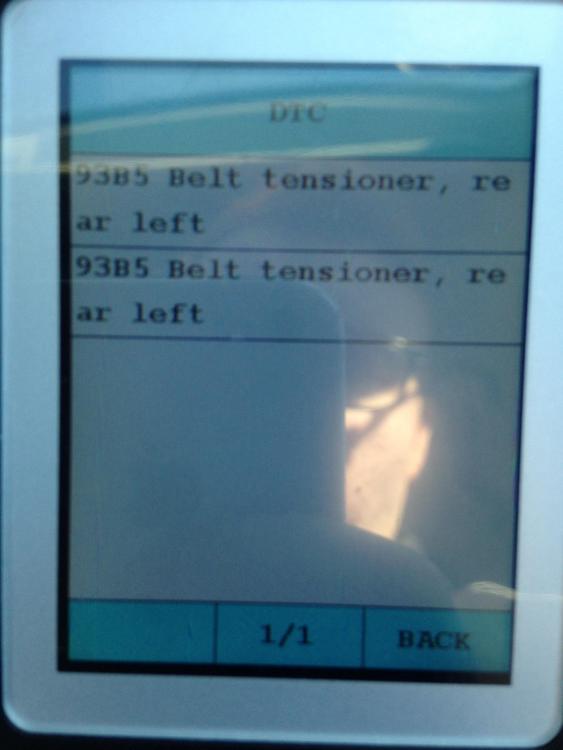
  3. Morning All, I've recently bought a CAt D 3 series which was involved in a accident. I've replaced everything required to clear the faults. But I'm left with the 93B5 code displayed twice on my diagnostic scanner. (See Attachment). Has anyone had this type of issue before? I have no other codes within the Air Bag Module. Cheers
eBay disclaimer: As the club is an eBay Partner, The club may be compensated if you make a purchase you make on eBay via the club.

DISCLAIMER: Bimmerownersclub.com is an independent BMW car forum for owners of BMW vehicles. The club is not part of BMW nor affiliated with or endorsed by the offical BMW AG in any way. The material contained in the forums is submitted by the general public, and is not endorsed by Bimmer Owners Club, BMW AG, or Bayerische Motoren Werke AG. The official website for BMW AG can be found at http://www.bmw.co.uk
Background Picker
Customize Layout

Configure browser push notifications

Chrome (Android)
  1. Tap the lock icon next to the address bar.
  2. Tap Permissions → Notifications.
  3. Adjust your preference.
Chrome (Desktop)
  1. Click the padlock icon in the address bar.
  2. Select Site settings.
  3. Find Notifications and adjust your preference.