


Lockstock27
Members
-
Joined
-
Last visited
-
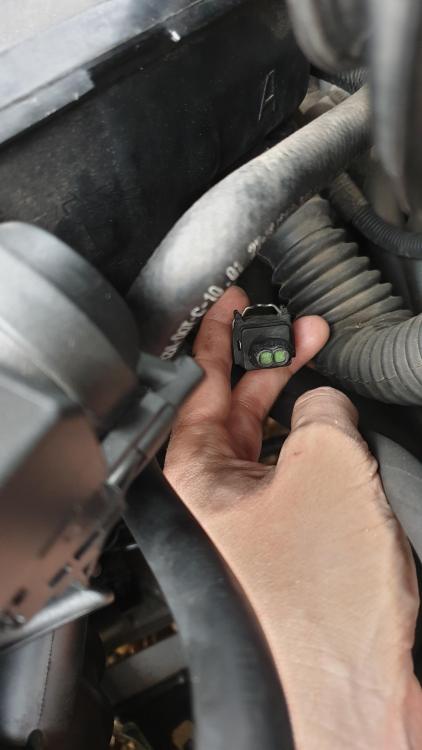
First time posting Hi! 😁 Just bought a 2001 525i with the 2.5 litre straight 6 engine. Needed the crankcase ventilation system replacing... someone had completely bypassed it off to a catch can and the poor custom pipework was causing leaks everywhere! Anyway... all back to stock now with the new insulated CCV and pipes. When I was in the process of disconnecting everything and came to remove the throttle body i notice a connector hanging loose to the right... further around the back of the engine and looks as though the wire is clipped up/fastened. I believe it's where the EGR is on some of the BMW engines? Used a mirror try and look further behind for any sockets missing connector but cant see anything? Ive attached an image - Please can someone advise? Makes me nervous having a connection just hanging there with nothing to plug into Thank you!

eBay disclaimer: As the club is an eBay Partner, The club may be compensated if you make a purchase you make on eBay via the club.
DISCLAIMER: Bimmerownersclub.com is an independent BMW car forum for owners of BMW vehicles. The club is not part of BMW nor affiliated with or endorsed by the offical BMW AG in any way. The material contained in the forums is submitted by the general public, and is not endorsed by Bimmer Owners Club, BMW AG, or Bayerische Motoren Werke AG. The official website for BMW AG can be found at http://www.bmw.co.uk
DISCLAIMER: Bimmerownersclub.com is an independent BMW car forum for owners of BMW vehicles. The club is not part of BMW nor affiliated with or endorsed by the offical BMW AG in any way. The material contained in the forums is submitted by the general public, and is not endorsed by Bimmer Owners Club, BMW AG, or Bayerische Motoren Werke AG. The official website for BMW AG can be found at http://www.bmw.co.uk