


3359
Regular Member
-
Joined
-
Last visited
-
Hi Dave I did try the BMW 1.4 several months ago but I just could not get my laptop to install the driver for the USB cable, I've since read that Windows 10 is not compatible with the cable, anyway I sent it back. I've now got hold of an old Windows 7 laptop and will try a cable with that when I get the time. Regarding the mirrors, it's not that I need to keep adjusting them, it's only when they are working correctly can I lock out the dipping of the passenger mirror, when they are not working the passenger mirror dips when reversing, which is something I don't want to happen when for example I'm in a car park and reversing into a spot in between two cars I need to be able to see out of the nearside mirror which I can't if it's tilted down to the ground, I can't see how close I am to the car on the nearside. I'm the only driver of my car so the seat and mirror settings are unchanged. I did go out the other day and found the mirrors were working , and when I reversed on to my daughters drive the passenger mirror didn't dip, but when I got back home and reversed onto my drive the mirror dipped. Brian
-
Hi Dave At the last reset I did and the mirrors were working correctly I just sat in the car turned the ignition on altered the mirrors to make sure they were working turned the ignition off and without opening the door waited a few moments, turned the ignition back on and repeated the test. I did that for about five minutes before suddenly they no longer worked. At no time did I open a door, start the engine or use any other electrical item in the car, I just sat there turning the ignition off and on again until they stopped working, so I don't think a broken wire could be the problem. I'm assuming that when I took the car to the " BMW Specialist " he would have put it on a diagnostic scanner and cleared any fault codes. I have taken the door cards off both sides and checked all electrical connections to the mirror motors and the adjusting switch even though it is a new one, and everything is o.k. I'm at present investigating buying some kind of diagnostic scanner myself, but can't seem to make up mind whether to buy a Carly scanner which is pretty expensive because it is subscription based and cost £5 per month plus the cost of the OBD bluetooth scanner at about £70 or a K scan OBD cable, but that involves lots of complicated computer installing which fills me with dread. Maybe you have some knowledge of BMW specific scanners, if so I'd appreciate a heads up, I've looked at some of the hand held scanners such as Foxwell but can't seem to make my mind up whether they are genuine or some cheap knock-off from China or not. I will do as you suggest and look for any earthing points and clean them and let you know if it has any effect. Once again thanks for your help in trying to solve this very annoying and mystifying problem. Brian
-
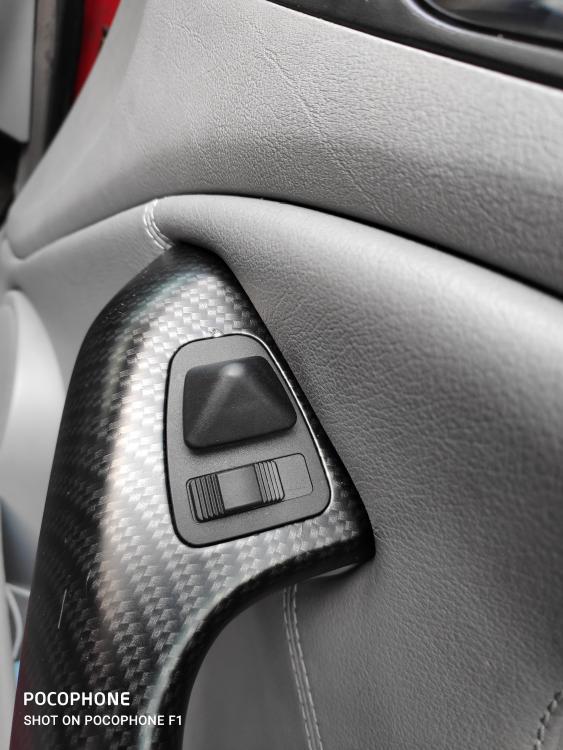
Hi Dave Thanks once again for your help trying to solve my problem with the mirrors. As you can see in the attached photo my adjusting control on the armrest is completely different to the example you sent me. I've tried sliding the selector switch over to the passenger side to lock out the dipping mirror in reverse, but it only works in the brief periods when the mirrors are working correctly. When the mirrors are not responding to the adjusting joystick, that's the big pyramid shaped control, sliding the selector switch over to the passenger side has no effect and the passenger mirror tilts downwards when selecting reverse. Yes I have got electric seats with memory and they are working normally. Brian
-
Hi Dave Thanks for the reply. Perhaps I should have made it clear that they are not electric folding mirrors. It is the adjustment of the mirrors that I'm having trouble with. I've found that unless the mirrors are working correctly I cannot lock out the nearside mirror, and prevent it from tilting down when reversing. I've already paid nearly £ 200 to a so called BMW specialist who told me the problem was the adjusting switch on the armrest which was replaced. It worked when I picked the car up but by the time I got home it no longer worked. I immediately phoned them to say it no longer worked, but he then suggested maybe the problem was with the motor in the mirrors and they should be replaced, I've made enquires at a BMW dealers and been told the cost of a motor is over £ 400 which I'm not prepared to shell out for when that might not be the problem. Brian
-
My electric door mirrors work intermittently. I can get them to work perfectly by disconnecting the battery for 24 hours, then on reconnecting the battery they work for about five minutes, then stop working again. Has anyone experienced this ? Is there some control unit that needs resetting or replacing ?
