


burger
Regular Member
-
Joined
-
Last visited
-
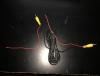
Hi, I'm fitting a Dynavin N6-E8X unit and a reversing camera on my 118i convertible but not sure what the red wires are that are coming off both ends of the lead that connects to the camera and the head unit. I think they are for interference and need to be grounded but not sure. Would be grateful of any advise. Thanks.
-
Thanks for reply Greydog have ordered a Dynavin unit as I thought the higher screen position was better and watching video's the interface seems really good
-
Hi, Looking to replace the stereo in my 118i 2.0 m sport convertible with a sat nav/Bluetooth/multi-media/ipod control unit. Would like to use the controls on the steering wheel. Any help as to which units are any good would be great. Cheers.
-
Hi, Just bought a 118i 2.0 m sport convertible and want to replace the head unit with one that has sat nav, Bluetooth and ipod connectivity. Also would like to be able to use the steering wheel controls. Seen a few different ones on the web but would like some input from someone that has fitted one of these units. Thanks.

eBay disclaimer: As the club is an eBay Partner, The club may be compensated if you make a purchase you make on eBay via the club.
DISCLAIMER: Bimmerownersclub.com is an independent BMW car forum for owners of BMW vehicles. The club is not part of BMW nor affiliated with or endorsed by the offical BMW AG in any way. The material contained in the forums is submitted by the general public, and is not endorsed by Bimmer Owners Club, BMW AG, or Bayerische Motoren Werke AG. The official website for BMW AG can be found at http://www.bmw.co.uk
DISCLAIMER: Bimmerownersclub.com is an independent BMW car forum for owners of BMW vehicles. The club is not part of BMW nor affiliated with or endorsed by the offical BMW AG in any way. The material contained in the forums is submitted by the general public, and is not endorsed by Bimmer Owners Club, BMW AG, or Bayerische Motoren Werke AG. The official website for BMW AG can be found at http://www.bmw.co.uk